JsonApi4j Documentation
Introduction
JsonApi4j is a modern, lightweight Java framework for building well-structured, scalable, and production-ready RESTful APIs.
It streamlines the API design and development process by enforcing a consistent data format, eliminating repetitive boilerplate, and providing clear extension points for advanced use cases.
Unlike generic REST frameworks, JsonApi4j is purpose-built around the JSON:API specification, which promotes best practices and addresses common pain points in designing and maintaining mature APIs.
This approach helps organizations drastically simplify API governance at scale.
By abstracting the repetitive parts of RESTful design, JsonApi4j enables developers to focus on business logic instead of API plumbing.
Why JsonApi4j?
The following features and design principles will help you determine whether JsonApi4j fits your use case.
Organizational & Business Motivation
Modern systems often consist of multiple services that need to expose and consume consistent data structures.
JsonApi4j helps achieve this by:
- 🧩 Implements the JSON:API specification, providing a predictable, efficient, and scalable data exchange format - eliminating the need for custom, company-wide API guidelines.
- 📘 Generates OpenAPI specifications out of the box, enabling clear and transparent API documentation across the organization.
Engineering Motivation
Whether you’re standardizing your organization’s API layer or building a new service from scratch, JsonApi4j provides a strong foundation for creating robust, performant, and secure APIs.
-
⚙️ Framework Agnostic. Works with all modern Java web frameworks - including Spring Boot, Quarkus, and JAX-RS.
The HTTP layer is built on top of the Jakarta Servlet API, the foundation for all Java web applications. -
🔄 JSON:API-compliant request and response processing. Includes automatic error handling fully aligned with the JSON:API specification.
-
🔐 Flexible authentication and authorization model. Supports fine-grained access control, including per-field data anonymization based on access tier, user scopes, and resource ownership.
-
🚀 Parallel and concurrent execution. The framework parallelizes every operation that can safely run concurrently - from relationship resolution to compound document processing - and supports advanced concurrency optimizations, including virtual threads.
-
📦 Compound Documents. Supports multi-level
includequeries (for example,include=comments.authors.followers) for complex, client-driven requests.
The compound document resolver is available as a standalone, embeddable module that can also run at the API Gateway level, using a shared resource cache to reduce latency and improve performance. -
🔌 Pluggable architecture. Designed for extensibility with rich customization capabilities and support for user-defined plugins.
-
🧠 Declarative approach with minimal boilerplate. Simply define your domain models (resources and relationships), supported operations, and authorization rules - the framework handles the rest.
Sample Apps
Example applications are available in the examples directory — check them out for practical guidance on using the framework.
Getting Started
Let’s take a quick look at what a typical JsonApi4j-based service looks like in code.
As an example, we’ll integrate JsonApi4j into a clean or existing Spring Boot application.
1. Add Dependency
Maven
<dependency>
  <groupId>pro.api4</groupId>
  <artifactId>jsonapi4j-rest-springboot</artifactId>
  <version>${jsonapi4j.version}</version>
</dependency>
Gradle
implementation "pro.api4:jsonapi4j-rest-springboot:${jsonapi4jVersion}"
The framework modules are published to Maven Central. You can find the latest available versions here.
2. Declare the Domain
Let’s implement a simple application that exposes two resources - users and countries - and defines a relationship between them, representing which citizenships (or passports) each user holds.
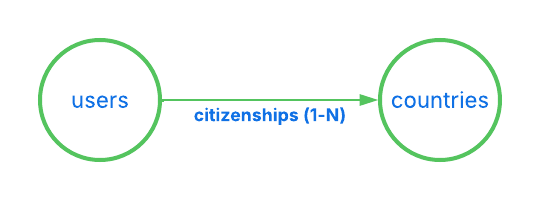
Then, let’s implement a few operations for these resources - reading multiple users and countries by their IDs, and retrieving which citizenships each user has.
3. Define the JSON:API Resource for Users
As mentioned above, let’s start by defining our first JSON:API resource - user resource.
@Component
public class UserResource implements Resource<UserDbEntity> {

    @Override
    public String resolveResourceId(UserDbEntity userDbEntity) {
      return userDbEntity.getId();
    }

    @Override
    public ResourceType resourceType() {
      return () -> "users";
    }

    @Override
    public UserAttributes resolveAttributes(UserDbEntity userDbEntity) {
      return new UserAttributes(
              userDbEntity.getFirstName() + " " + userDbEntity.getLastName(),
              userDbEntity.getEmail(),
              userDbEntity.getCreditCardNumber()
      );
    }
}
What’s happening here:
String resourceId(UserDbEntity userDbEntity)returns the unique identifier for this resource, must be unique across all resources of this type.ResourceType resourceType()defines a unique resource type name (usersin this case). Each resource in your API must have a distinct type.UserAttributes resolveAttributes(UserDbEntity userDbEntity)- (optional) maps internal domain data (UserDbEntity) to the public API-facing representation (UserAttributes)
Each resource is parametrized with a type:
UserDbEntity- is represented internally.
While UserAttributes represents what is exposed via API.
Here’s a draft implementation of both classes:
public class UserAttributes {

    private final String firstName;
    private final String lastName;
    private final String email;
    private final String creditCardNumber;

    // constructors, getters and setters

}
public class UserDbEntity {

    private final String id;
    private final String fullName;
    private final String email;
    private final String creditCardNumber;

    // constructors, getters and setters

}
Internal models (like UserDbEntity in this case) often differ from UserAttributes. They may encapsulate database-specific details (for example, a Hibernate entity or a JOOQ record), represent a DTO from an external service, or even aggregate data from multiple sources.
4. Declare the JSON:API Operation — Read Multiple Users
Now that we’ve defined our resource and attributes, let’s implement the first operation to read all users.
This operation will be available under GET /users.
@Component
public class ReadMultipleUsersOperation implements ReadMultipleResourcesOperation<UserDbEntity> {

    private final UserDb userDb;

    public ReadAllUsersOperation(UserDb userDb) {
        this.userDb = userDb;
    }

    @Override
    public ResourceType resourceType() {
        return () -> "users";
    }

    @Override
    public CursorPageableResponse<UserDbEntity> readPage(JsonApiRequest request) {
        UserDb.DbPage<UserDbEntity> pagedResult = userDb.readAllUsers(request.getCursor());
        return new CursorPageableResponse.fromItemsAndCursor(
                pagedResult.getEntities(),
                pagedResult.getCursor()
        );
    }

}
-
resourceType()- identify which resource this operation belongs to (users). -
The
UserDbclass doesn’t depend on any JsonApi4j-specific interfaces or components — it simply represents your data source. In a real application, this could be an ORM entity manager, a JOOQ repository, a REST client, or any other persistence mechanism. For the sake of this demo, here’s a simple in-memory implementation to support the operation above:
@Component
public class UserDb {

    private Map<String, UserDbEntity> users = new ConcurrentHashMap<>();
    {
        users.put("1", new UserDbEntity("1", "John Doe", "john@doe.com", "123456789"));
        users.put("2", new UserDbEntity("2", "Jane Doe", "jane@doe.com", "222456789"));
        users.put("3", new UserDbEntity("3", "Jack Doe", "jack@doe.com", "333456789"));
        users.put("4", new UserDbEntity("4", "Jessy Doe", "jessy@doe.com", "444456789"));
        users.put("5", new UserDbEntity("5", "Jared Doe", "jared@doe.com", "555456789"));
    }

    public DbPage<UserDbEntity> readAllUsers(String cursor) {
        LimitOffsetToCursorAdapter adapter = new LimitOffsetToCursorAdapter(cursor).withDefaultLimit(2); // let's say our page size is 2
        LimitOffsetToCursorAdapter.LimitAndOffset limitAndOffset = adapter.decodeLimitAndOffset();

        int effectiveFrom = limitAndOffset.getOffset() < users.size() ? limitAndOffset.getOffset() : users.size() - 1;
        int effectiveTo = Math.min(effectiveFrom + limitAndOffset.getLimit(), users.size());

        List<UserDbEntity> result = new ArrayList<>(users.values()).subList(effectiveFrom, effectiveTo);
        String nextCursor = adapter.nextCursor(users.size());
        return new DbPage<>(nextCursor, result);
    }

    public static class DbPage<E> {

        private final String cursor;
        private final List<E> entities;

        public DbPage(String cursor, List<E> entities) {
            this.cursor = cursor;
            this.entities = entities;
        }

        public String getCursor() {
            return cursor;
        }

        public List<E> getEntities() {
            return entities;
        }
    }
}
You can now run your application (for example, on port 8080 by setting Spring Boot’s property to server.port=8080) and send the next HTTP request: /users?page[cursor]=DoJu.
And then you should receive a paginated, JSON:API-compliant response such as:
{
  "data": [
    {
      "attributes": {
        "fullName": "Jack Doe",
        "email": "jack@doe.com",
        "creditCardNumber": "333456789"
      },
      "links": {
        "self": "/users/3"
      },
      "id": "3",
      "type": "users"
    },
    {
      "attributes": {
        "fullName": "Jessy Doe",
        "email": "jessy@doe.com",
        "creditCardNumber": "444456789"
      },
      "links": {
        "self": "/users/4"
      },
      "id": "4",
      "type": "users"
    }
  ],
  "links": {
    "self": "/users?page%5Bcursor%5D=DoJu",
    "next": "/users?page%5Bcursor%5D=DoJw"
  }
}
Try to remove page[cursor]=xxx query parameter - it will just start reading user resources from the very beginning.
5. Define the JSON:API Resource for Countries
Similar to the users resource, we need to declare a dedicated JSON:API resource representing a citizenship - in this case, a resource of type country.
@Component
public class CountryResource implements Resource<DownstreamCountry> {

    @Override
    public String resolveResourceId(DownstreamCountry downstreamCountry) {
        return downstreamCountry.getCca2(); // let's use CCA2 code as a unique country identifier
    }

    @Override
    public ResourceType resourceType() {
        return () -> "countries";
    }

    @Override
    public CountryAttributes map(DownstreamCountry downstreamCountry) {
        return new CountryAttributes(
                downstreamCountry.getName().getCommon(),
                downstreamCountry.getRegion()
        );
    }

}
This resource is parametrized with a type: DownstreamCountry.
public class DownstreamCountry {

    private final String cca2;
    private final Name name;
    private final String region;

    // constructors, getters and setters

    public static class Name {

        private final String common;
        private final String official;

        // constructors, getters and setters

    }

}
And here is a custom CountryAttributes that represents an API-facing version of a country:
public class CountryAttributes {

    private final String name;
    private final String region;

    // constructors, getters and setters

}
In this example, we expose only the name and region fields through the attributes, using .getName().getCommon() for the country name. While cca2 is used as a country ID.
6. Add a JSON:API Relationship - User Citizenships
Now that we’ve defined our first resources, let’s establish a relationship between them.
We’ll define a relationship called citizenships between the UserJsonApiResource and CountryJsonApiResource.
Each user can have multiple citizenships, which makes this a to-many relationship (represented by an array of resource identifier objects).
To implement this, we’ll create a class that implements the ToManyRelationship interface:
@Component
public class UserCitizenshipsRelationship implements ToManyRelationship<UserDbEntity, DownstreamCountry> {

    @Override
    public Relationship relationshipName() {
        return () -> "citizenships";
    }

    @Override
    public ResourceType resourceType() {
        return () -> "users";
    }

    @Override
    public ResourceType resolveResourceIdentifierType(DownstreamCountry downstreamCountry) {
        return () -> "countries";
    }

    @Override
    public String resolveResourceIdentifierId(DownstreamCountry downstreamCountry) {
        return downstreamCountry.getCca2();
    }

}
-
Relationship relationshipName()- defines the name of the relationship (citizenships). -
ResourceType resourceType()- identifies which resource this relationship belongs to (users). -
ResourceType resolveResourceIdentifierType(DownstreamCountry downstreamCountry)- determines the type of the related resource (countries). In some cases, a relationship may include multiple resource types - for example, auserPropertyrelationship could contain a mix ofcars,apartments, oryachts. -
String resolveResourceIdentifierId(DownstreamCountry downstreamCountry)- resolves the unique identifier of each related resource (e.g., the country’s CCA2 code).
7. Add the Missing Relationship Operation
The final piece of the puzzle is teaching the framework how to resolve the declared relationship data.
To do this, implement ReadToManyRelationshipOperation<DownstreamCountry> - this tells JsonApi4j how to find the related country resources (i.e., which passports or citizenships each user has).
@Component
public class ReadUserCitizenshipsRelationshipOperation implements ReadToManyRelationshipOperation<DownstreamCountry> {

    private final RestCountriesFeignClient client;
    private final UserDb userDb;

    public ReadUserCitizenshipsRelationshipOperation(RestCountriesFeignClient client,
                                                     UserDb userDb) {
        this.client = client;
        this.userDb = userDb;
    }


    @Override
    public CursorAwareResponse<DownstreamCountry> read(JsonApiRequest request) {
        return CursorPageableResponse.fromItemsPageable(
                client.readCountriesByIds(userDb.getUserCitizenships(request.getResourceId())),
                request.getCursor(),
                2 // set limit to 2
        );
    }

    @Override
    public RelationshipName relationshipName() {
        return () -> "citizenships";
    }

    @Override
    public ResourceType resourceType() {
        return () -> "users";
    }

}
-
relationshipName()andresourceType()uniquely identify which resource and relationship this operation belongs to (usersandcitizenshipsaccordingly). -
RestCountriesFeignClientcould be a Feign client representing a third-party API - for example, the restcountries service. For simplicity, let’s keep it local for now and simulate its behavior with an in-memory implementation:
@Component
public class RestCountriesFeignClient {

  private static final Map<String, DownstreamCountry> COUNTRIES = Map.of(
          "NO", new DownstreamCountry("NO", new Name("Norway", "Kingdom of Norway"), "Europe"),
          "FI", new DownstreamCountry("FI", new Name("Finland", "Republic of Finland"), "Europe"),
          "US", new DownstreamCountry("US", new Name("United States", "United States of America"), "Americas")
  );

  public List<DownstreamCountry> readCountriesByIds(List<String> countryIds) {
    return countryIds.stream().filter(COUNTRIES::containsKey).map(COUNTRIES::get).toList();
  }

}
We also need to extend our existing UserDb to include information about which countries each user holds passports from (identified by their CCA2 codes).
public class UserDb {

    //  ...

    private Map<String, List<String>> userIdToCountryCca2 = new ConcurrentHashMap<>();
    {
        userIdToCountryCca2.put("1", List.of("NO", "FI", "US"));
        userIdToCountryCca2.put("2", List.of("US"));
        userIdToCountryCca2.put("3", List.of("US", "FI"));
        userIdToCountryCca2.put("4", List.of("NO", "US"));
        userIdToCountryCca2.put("5", List.of("US"));
    }

    public List<String> getUserCitizenships(String userId) {
        return userIdToCountryCca2.get(userId);
    }

    // ...

}
Finally, this operation will be available under GET /users/{userId}/relationships/citizenships.
8. Enable Compound Documents (Optional)
To support Compound Documents, implement ReadMultipleResourcesOperation<DownstreamCountry> with an id filter. This allows the framework to resolve included resources efficiently when requested via the include query parameter.
While you could also implement ReadByIdOperation<DownstreamCountry>, this approach is less efficient because compound documents would be resolved sequentially, one by one, instead of using a single batch request via filter[id]=x,y,z.
@Component
public class ReadMultipleCountriesOperation implements ReadMultipleResourcesOperation<DownstreamCountry> {

    private final RestCountriesFeignClient client;

    public ReadAllCountriesOperation(RestCountriesFeignClient client) {
        this.client = client;
    }

    @Override
    public ResourceType resourceType() {
        return () -> "countries";
    }

    @Override
    public CursorPageableResponse<DownstreamCountry> readPage(JsonApiRequest request) {
        if (request.getFilters().containsKey(ID_FILTER_NAME)) {
            return CursorPageableResponse.byItems(client.readCountriesByIds(request.getFilters().get(ID_FILTER_NAME)));
        } else {
            throw new JsonApi4jException(400, CommonCodes.MISSING_REQUIRED_PARAMETER, "Operation supports 'id' filter only");
        }
    }

}
-
resourceType()- identify which resource this operation belongs to (countries). -
readPage(JsonApiRequest request)- delegates to the already implementedreadCountriesByIds(...). For now, this operation only supports requests usingfilter[id]=x,y,z. Support for read all or additional filters (e.g., by region) can be added later if needed.
This operation will be available under GET /countries?filter[id]=x,y,z.
Now we can finally start exploring some more exciting HTTP requests. Check out the next section for hands-on examples!
9. Request/Response Examples
Fetch a User’s Citizenship Relationships
Request: /users/1/relationships/citizenships
Response:
{
  "data": [
    {
      "id": "NO",
      "type": "countries"
    },
    {
      "id": "FI",
      "type": "countries"
    }
  ],
  "links": {
    "self": "/users/1/relationships/citizenships",
    "related": {
      "countries": {
        "href": "/countries?filter[id]=FI,NO",
        "describedby": "https://api4.pro/oas-schema-to-many-relationships-related-link.yaml",
        "meta": {
          "ids": ["FI", "NO"]
        }
      }
    },
    "next": "/users/1/relationships/citizenships?page%5Bcursor%5D=DoJu"
  }
}
It’s worth noting that each relationship has its own pagination. The link to the next page can be found in the response under links -> next.
For example, to fetch the second page of a user’s citizenships relationship, try: /citizenships?page[cursor]=DoJu](http://localhost:8080/jsonapi/users/1/relationships/citizenships?page%5Bcursor%5D=DoJu)
Fetch a User’s Citizenship Relationships Along with Corresponding Country Resources
Request: /users/1/relationships/citizenships?include=citizenships
Response:
{
  "data": [
    {
      "id": "NO",
      "type": "countries"
    },
    {
      "id": "FI",
      "type": "countries"
    }
  ],
  "links": {
    "self": "/users/1/relationships/citizenships?include=citizenships",
    "related": {
      "countries": {
        "href": "/countries?filter[id]=FI,NO",
        "describedby": "https://api4.pro/oas-schema-to-many-relationships-related-link.yaml",
        "meta": {
          "ids": ["FI", "NO"]
        }
      }
    },
    "next": "/users/1/relationships/citizenships?include=citizenships&page%5Bcursor%5D=DoJu"
  },
  "included": [
    {
      "attributes": {
        "name": "Norway",
        "region": "Europe"
      },
      "links": {
        "self": "/countries/NO"
      },
      "id": "NO",
      "type": "countries"
    },
    {
      "attributes": {
        "name": "Finland",
        "region": "Europe"
      },
      "links": {
        "self": "/countries/FI"
      },
      "id": "FI",
      "type": "countries"
    }
  ]
}
Fetch Multiple Countries by IDs
Request: /countries?filter[id]=US,NO
Response:
{
"data": [
    {
      "attributes": {
        "name": "Norway",
        "region": "Europe"
      },
      "links": {
        "self": "/countries/NO"
      },
      "id": "NO",
      "type": "countries"
    },
    {
      "attributes": {
        "name": "United States",
        "region": "Americas"
      },
      "links": {
        "self": "/countries/US"
      },
      "id": "US",
      "type": "countries"
    }
  ],
  "links": {
    "self": "/countries?filter%5Bid%5D=US%2CNO"
  }
}
Fetch a Specific Page of Users with Citizenship Linkage Objects and Resolved Country Resources
Request: /users?page[cursor]=DoJu&include=citizenships
Response:
{
  "data": [
    {
      "attributes": {
        "fullName": "Jack Doe",
        "email": "jack@doe.com"
      },
      "relationships": {
        "citizenships": {
          "data": [
            {
              "id": "US",
              "type": "countries"
            },
            {
              "id": "FI",
              "type": "countries"
            }
          ],
          "links": {
            "self": "/users/3/relationships/citizenships",
            "related": {
              "countries": {
                "href": "/countries?filter[id]=FI,US",
                "describedby": "https://api4.pro/oas-schema-to-many-relationships-related-link.yaml",
                "meta": {
                  "ids": ["FI", "US"]
                }
              }
            }
          }
        }
      },
      "links": {
        "self": "/users/3"
      },
      "id": "3",
      "type": "users"
    },
    {
      "attributes": {
        "fullName": "Jessy Doe",
        "email": "jessy@doe.com"
      },
      "relationships": {
        "citizenships": {
          "data": [
            {
              "id": "NO",
              "type": "countries"
            },
            {
              "id": "US",
              "type": "countries"
            }
          ],
          "links": {
            "self": "/users/4/relationships/citizenships",
            "related": {
              "countries": {
                "href": "/countries?filter[id]=NO,US",
                "describedby": "https://api4.pro/oas-schema-to-many-relationships-related-link.yaml",
                "meta": {
                  "ids": ["NO", "US"]
                }
              }
            }
          }
        }
      },
      "links": {
        "self": "/users/4"
      },
      "id": "4",
      "type": "users"
    }
  ],
  "links": {
    "self": "/users?include=citizenships&page%5Bcursor%5D=DoJu",
    "next": "/users?include=citizenships&page%5Bcursor%5D=DoJw"
  },
  "included": [
    {
      "attributes": {
        "name": "Norway",
        "region": "Europe"
      },
      "links": {
        "self": "/countries/NO"
      },
      "id": "NO",
      "type": "countries"
    },
    {
      "attributes": {
        "name": "Finland",
        "region": "Europe"
      },
      "links": {
        "self": "/countries/FI"
      },
      "id": "FI",
      "type": "countries"
    },
    {
      "attributes": {
        "name": "United States",
        "region": "Americas"
      },
      "links": {
        "self": "/countries/US"
      },
      "id": "US",
      "type": "countries"
    }
  ]
}
Framework internals
Project structure
JsonApi4j is designed to be modular and embeddable, allowing you to use only the parts you need depending on your application context. Each module is published as a separate artifact in Maven Central.
- 🌀 jsonapi4j-core — a lightweight JSON:API request processor, ideal for embedding into non-web services (e.g., CLI tools) that need to handle JSON:API input/output without bringing in HTTP-related dependencies.
- 🔌 jsonapi4j-rest — the Servlet API–based HTTP layer for integration with any Java web framework. Can be used directly in plain Servlet applications or as a foundation for building native integrations for frameworks like Spring Boot, Quarkus, etc.
- 🌱 jsonapi4j-rest-springboot — Spring Boot auto-configuration module that integrates JsonApi4j seamlessly into a Spring environment.
- 🌐 jsonapi4j-compound-docs-resolver — a standalone compound documents resolver that automatically fetches and populates the
includedsection of JSON:API responses. Perfect for API Gateway-level use or microservice response composition layers.
Here’s how transitive dependencies between modules are structured in the framework:
jsonapi4j-core
│
├── jsonapi4j-compound-docs-resolver
│
└── jsonapi4j-rest
    ├── depends on → jsonapi4j-core
    └── depends on → jsonapi4j-compound-docs-resolver
        │
        └── jsonapi4j-rest-springboot
            └── depends on → jsonapi4j-rest
In short - if you’re integrating JsonApi4j with a Spring Boot application, you only need to include a single dependency:
jsonapi4j-rest-springboot.
Designing the Domain
As highlighted earlier in the Getting Started guide, designing your domain model is one of the most important steps - and typically the first one - when building APIs with JsonApi4j. A well-structured domain design ensures clear resource boundaries, consistent data representation, and smoother integration with the JSON:API specification.
There are a few extension points that are important to understand when working with JsonApi4j. In most cases, you’ll simply implement one or more predefined interfaces that allow the framework to recognize and apply your domain configuration automatically.
All domain-related interfaces are located in the jsonapi4j-core module under the pro.api4.jsonapi4j.domain package.
Here are the most essential ones:
Resource<RESOURCE_DTO>- implement this interface to declare a new JSON:API resourceToOneRelationship<RESOURCE_DTO, RELATIONSHIP_DTO>- implement this interface to declare a new JSON:API to-one relationshipToManyRelationship<RESOURCE_DTO, RELATIONSHIP_DTO>- implement this interface to declare a new JSON:API to-many relationship
Resource
This is the primary interface for defining a JSON:API resource. It describes how your internal model is going to be represented by JSON:API documents.
Think about resources as of vertices (or nodes) in a graph.
Type parameter:
RESOURCE_DTO- the internal data object or DTO from your domain or persistence layer (UserDbEntity,DownstreamCountry, etc.).
Mandatory / Key Responsibilities:
- Provide a unique resource ID. Implement
resolveResourceId(RESOURCE_DTO dataSourceDto)). This is mandatory for every resource and ensures each object can be uniquely identified. - Define the resource type. Implement
resolveResourceId()). This is mandatory to differentiate resource types across your APIs. - Map internal objects to API-facing attributes. Implement
resolveAttributes(RESOURCE_DTO dataSourceDto)). By default, attributes arenull, but most resources should define this as it represents the core domain information.
Optional / Advanced Capabilities:
- Top-level links for single resource documents. Implement
resolveTopLevelLinksForSingleResourceDoc(JsonApiRequest request, RESOURCE_DTO dataSourceDto)). By default, generates “self” member only. - Top-level links for multi-resource documents. Implement
resolveTopLevelLinksForMultiResourcesDoc(JsonApiRequest request, List<RESOURCE_DTO> dataSourceDtos, String nextCursor)). By default, generates “self” and “next” members if applicable. - Top-level meta for single resource documents. Implement
resolveTopLevelMetaForSingleResourceDoc(JsonApiRequest request, RESOURCE_DTO dataSourceDto). By default, generatesnull. - Top-level meta for multi-resource documents. Implement
resolveTopLevelMetaForMultiResourcesDoc(JsonApiRequest request, List<RESOURCE_DTO> dataSourceDtos). By default, generatesnull. - Resource-level links. Implement
resolveResourceLinks(JsonApiRequest request, RESOURCE_DTO dataSourceDto). By default, generates a “self” link. - Resource-level meta. Implement
resolveResourceMeta(JsonApiRequest request, RESOURCE_DTO dataSourceDto)). By default, generatesnull.
ToOneRelationship<RESOURCE_DTO, RELATIONSHIP_DTO>
This interface is used to define a To-One relationship between a JSON:API resource and another related resource. It allows the framework to map and expose single-valued relationships in a JSON:API-compliant response.
Think of this relationship as a 1-to-1 edge in a graph, where one parent resource can reference a single related resource.
Type parameters:
RESOURCE_DTO- the internal data object or DTO representing the parent resource (e.g.,UserDbEntity).RELATIONSHIP_DTO- the internal data object or DTO representing the related resource (e.g.,DownstreamCountry).
Mandatory / Key Responsibilities:
- Define the relationship name. Implement
relationshipName(). This identifies the relationship field in the JSON:API document. - Specify the parent resource type. Implement
resourceType(). This tells the framework which resource the relationship belongs to. - Resolve the related resource type. Implement
resolveResourceIdentifierType(RELATIONSHIP_DTO relationshipDto). This defines the type of the related resource in the JSON:API document. - Resolve the related resource ID. Implement
resolveResourceIdentifierId(RELATIONSHIP_DTO relationshipDto). This should return a unique identifier for the related resource.
Optional / Advanced Capabilities:
- Customize relationship links. Implement
resolveRelationshipLinks(JsonApiRequest request, RESOURCE_DTO resourceDto, RELATIONSHIP_DTO relationshipDto). By default, generates “self” and “related” links for the relationship. - Customize relationship meta. Implement
resolveRelationshipMeta(JsonApiRequest request, RESOURCE_DTO resourceDto, RELATIONSHIP_DTO relationshipDto). By default, generatesnull.
Notes:
- A To-One relationship always resolves to a single resource identifier object (or
null) in the JSON:API response. - Multiple relationships can be defined for the same resource by implementing multiple
ToOneRelationshipinstances.
ToManyRelationship<RESOURCE_DTO, RELATIONSHIP_DTO>
This interface is used to define a To-Many relationship between a JSON:API resource and another related resource. It allows the framework to map and expose multivalued relationships in a JSON:API-compliant response.
Think of this relationship as a 1-to-N edge in a graph, where one parent resource can reference multiple related resources.
Refer to the ToOneRelationship section for additional details, as the key concepts and advanced capabilities are largely the same.
Implementing Operations
Operations focus on retrieving internal models, which are then converted into JSON:API-compliant responses. Operations that modify data accept JSON:API-compliant payloads and update the internal data accordingly.
The JSON:API specification defines a limited set of standard operations. Some variations with JSON:API specification are acceptable, but the framework selects the one that makes the most sense for a given context.
All operation interfaces are located in the jsonapi4j-core module under the pro.api4.jsonapi4j.operation package.
By default, all JsonApi4j operations are exposed under the /jsonapi root path. This prevents conflicts when integrating JSON:API endpoints into an existing application that may have other REST endpoints. To change the root path, simply set the jsonapi4j.root-path property.
Here is the list of available operations:
Resource-related operations:
ReadResourceByIdOperation<RESOURCE_DTO>- available underGET /{resource-type}/{resource-id}, supports compound documents JSON:API featureRESOURCE_DTO readById(JsonApiRequest request)- reads a single internal object representing a JSON:API resource of the specified type.
ReadMultipleResourcesOperation<RESOURCE_DTO>- available underGET /{resource-type}, supports compound documents, filtering, and ordering JSON:API featuresCursorPageableResponse<RESOURCE_DTO> readPage(JsonApiRequest request)- reads multiple internal objects representing JSON:API resources of the specified type.
CreateResourceOperation<RESOURCE_DTO>- available underPOST /{resource-type}, accepts valid JSON:API Document as a payload.RESOURCE_DTO create(JsonApiRequest request)- creates a single object in the backend system and returns its internal representation.
UpdateResourceOperation- available underPATCH /{resource-type}/{resource-id}, accepts valid JSON:API Document as a payload.void update(JsonApiRequest request)- updates a single object in the backend system.
DeleteResourceOperation- available underDELETE /{resource-type}/{resource-id}.void delete(JsonApiRequest request)- deletes a single object in the backend system.
Relationship-related operations:
ReadToOneRelationshipOperation<RESOURCE_DTO, RELATIONSHIP_DTO>- available underGET /{resource-type}/{resource-id}/relationships/{relationship-name}, supports compound documents JSON:API featureread(JsonApiRequest relationshipRequest)- reads a single internal object representing a JSON:API resource identifier for the given to-one resource relationship.readForResource(JsonApiRequest relationshipRequest, RESOURCE_DTO resourceDto)- optional. Resolves an internal relationship’s object directly from the parent resource’s internal object if it’s possible. This avoids an external request. Used when theincludequery parameter is specified for any resource-related read operation.
ReadToManyRelationshipOperation<RESOURCE_DTO, RELATIONSHIP_DTO>- available underGET /{resource-type}/{resource-id}/relationships/{relationship-name}, supports compound documents, filtering, and ordering JSON:API featuresCursorPageableResponse<RELATIONSHIP_DTO> read(JsonApiRequest relationshipRequest)- similar toReadToOneRelationshipOperationbut returns a pageable collection of objects.CursorPageableResponse<RELATIONSHIP_DTO> readForResource(JsonApiRequest relationshipRequest, RESOURCE_DTO resourceDto)- similar toReadToOneRelationshipOperationbut returns a pageable collection of objects.
UpdateToOneRelationshipOperation- available underPATCH /{resource-type}/{resource-id}/relationships/{relationship-name}, accepts valid JSON:API Document as a payload.void update(JsonApiRequest request)- updates or deletes a single resource linkage representing a To-One JSON:API relationship in the backend.
UpdateToManyRelationshipOperation- available underPATCH /{resource-type}/{resource-id}/relationships/{relationship-name}, accepts valid JSON:API Document as a payload.void update(JsonApiRequest request)- updates or deletes all resource linkages representing a To-Many JSON:API relationship in the backend.
Validation.
- Every operation has an optional
validate(JsonApiRequest request)method sometimes with a default generic implementation. It is recommended to place all input validation logic here, keeping the main business logic in the corresponding operation method.- If a resource is not found in the backend system, throw
ResourceNotFoundExceptionor usethrowResourceNotFoundException(...)method. This will generate a JSON:API compliant error response. - For other scenarios, throw
JsonApi4jExceptionand specifyhttpStatus,errorCode, anddetail. This will generate a JSON:API compliant error response. - See Register custom error handlers chapter for additional ways to handle errors, for example, integration with custom validation frameworks.
- If a resource is not found in the backend system, throw
Register custom error handlers
It’s also possible to declare a custom ErrorHandlerFactory and register it in the JsonApi4jErrorHandlerFactoriesRegistry. This allows you to extend the default error-handling behavior.
Two error handler factories are registered by default:
DefaultErrorHandlerFactory- encapsulates the logic for mapping framework-specific exceptions (such asJsonApi4jException,ResourceNotFoundException, and other technical exceptions) into JSON:API-compliant error documentsJsr380ErrorHandlers- encapsulates the logic for mappingjakarta.validation.ConstraintViolationExceptionexception (JSR-380) into JSON:API error documents.
Access Control
Evaluation stages
Access control evaluation is performed twice during the request lifecycle - during the inbound and outbound stages.
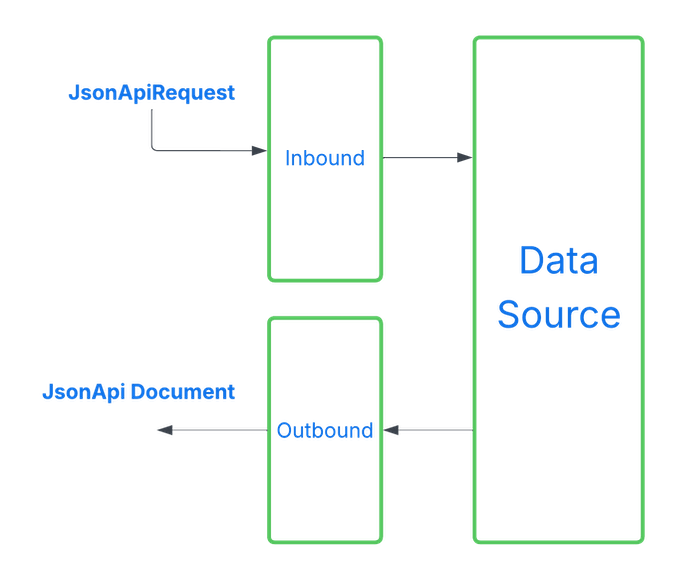
Inbound Evaluation Stage
During the inbound stage, the JsonApi4j application has received a request but has not yet fetched any data from downstream sources.
Access control rules are evaluated against the JsonApiRequest since no other data is available at this point.
If access control requirements are not met, data fetching is skipped, and the data field in the response will be fully anonymized.
Inbound access control requirements can be defined on an operations level by placing @AccessControl annotation on top of the class declaration.
Outbound Evaluation Stage
The outbound stage occurs after data has been fetched from the data source, the response document has been composed, and right before it is sent to the client. At this point, access control rules are evaluated for each JSON:API Resource Object or Resource Identifier Object within the generated JSON:API document.
Resource Documents
Resource documents typically contain full JSON:API Resource Objects.
Access control requirements can be defined for:
- Entire Resource Object - if requirements are not met, the whole resource is anonymized.
- Specific members (e.g.,
attributes,meta) - if requirements are not met, only those members are anonymized. - Entire
attributessection - if requirements are not met, allattributesare anonymized. - Individual
attributefields - if requirements are not met, only the affected fields are anonymized.
Relationship Documents
Relationship documents contain only Resource Identifier Objects. Access control rules can be defined for:
- Entire Resource Identifier Object - if requirements are not met, the entire resource identifier will be anonymized.
- Specific members (e.g.,
meta) - if requirements are not met, only those members will be anonymized.
Access Control Requirements
By default, JsonApi4j does not enforce any access control (i.e., all requests are allowed). However, you can configure and enforce access control rules for either or both stages - inbound and outbound - depending on your security and data exposure requirements.
There are four types of access control requirements, which can be combined in any way as needed:
- Authentication requirement - verifies whether the request is made on behalf of an authenticated client or user. This can be used to restrict anonymous access.
- Access tier requirement - verifies whether the client or user belongs to a specific access tier or group. The recommended default set of tiers includes: Root Admin, Admin, Partner, Internal, and Public. This structure helps organize access policies by predefined privilege levels. You don’t need to use all tiers - just rely on the ones that fit your needs. It’s also possible to define a custom set of access tiers. See more details below.
- OAuth2 scope(s) requirement - verifies whether the request was authorized to access user data protected by certain OAuth2 scopes. This information is typically embedded within the JWT access token.
- Ownership requirement - ensures that the requested resource belongs to the client or user making the request. This is typically used for APIs where users are only allowed to view their own data, but not others’.
If any of the specified requirements are not met, the corresponding section - or the entire object - will be anonymized.
Setting Principal Context
By default, the framework uses the DefaultPrincipalResolver, which relies on the following HTTP headers to resolve the current authentication context:
X-Authenticated-User-Id- identifies whether the request is sent on behalf of an authenticated client or user. Considered authenticated if the value is not null or blank. Also used for ownership checks.X-Authenticated-Client-Access-Tier- defines the principal’s access tier. By default, the framework supports the following values: NO_ACCESS, PUBLIC, PARTNER, ADMIN, and ROOT_ADMIN. Custom tiers can be registered by implementing theAccessTierRegistryinterface.X-Authenticated-User-Granted-Scopes- specifies the OAuth2 scopes granted to the client by the user. This should be a space-separated string.
You can also implement a custom PrincipalResolver to define how the framework retrieves principal-related information from incoming HTTP requests.
The resolved principal context is then used by the framework during both inbound and outbound access control evaluations.
Setting Access Requirements
How and where should you declare your access control requirements?
There is one annotation that defines all access control requirement in one place - @AccessControl.
It encapsulates rules for all currently supported dimensions: authenticated, scopes, tier, and ownership. Just populate you requirements there.
Please review the list of examples down below to getter a better grasp how and where to declare your access requirements.
Examples
Example 1: Inbound Access Control
Let’s allow new user creation only for authenticated clients with the ADMIN access tier.
In this case, we’ll use the @AccessControl annotation to enforce the access rule at the operation level.
@AccessControl(
        authenticated = Authenticated.AUTHENTICATED,
        tier = @AccessControlAccessTier(ADMIN_ACCESS_TIER)
)
@Component
public class CreateUserOperation implements CreateResourcesOperation<UserDbEntity> {

    // ...

}
Example 2: Outbound Access Control for Attributes Object
First, let’s limit access to a personal data for all non-authorized users.
Secondly, let’s hide the user’s credit card number from everyone except the owner. To achieve this, we need place the @AccessControl annotation on top of the class declaration and on the creditCardNumber field.
Notes:
authenticated = Authenticated.AUTHENTICATED- requires the framework to check whether the client that initiated this request is authenticated.@AccessControlScopes(requiredScopes = {"users.sensitive.read"})- forces the framework to check if client initiated this request has got permissions from the resource owner to access their sensitive data.@AccessControlOwnership(ownerIdFieldPath = "id")- tells the framework that the owner id is located in theidfield of the JSON:API Resource Object. That is true because we deal with users and user id represents who own this data.
@AccessControl(authenticated = Authenticated.AUTHENTICATED)
public class UserAttributes {

    private final String firstName;
    private final String lastName;
    private final String email;

    @AccessControl(
            authenticated = Authenticated.AUTHENTICATED,
            scopes = @AccessControlScopes(requiredScopes = {"users.sensitive.read"}),
            tier = @AccessControlAccessTier(TierAdmin.ADMIN_ACCESS_TIER),
            ownership = @AccessControlOwnership(ownerIdFieldPath = "id")
    )
    private final String creditCardNumber;

    // constructors, getters and setters

}
Example 3: Outbound Access Control for Resource Object
Now, let’s showcase how to hide some sections on the Resource Object level. Since we don’t have a dedicated class for it, we need to use our Resource declaration class for it.
Here is the list of available places where you can place @AccessControl annotation:
- On top of the Resource declaration - in order to control access to the entire JSON:API Resource Object
- For
Resource#resolveAttributes(...)method to control access just for resourceattributessection. As it was already shown above an alternative option is also to place@AccessControlon top of the attributes custom class. - For
Resource#resolveResourceLinks(...)method to control access just for resourcelinkssection. - For
Resource#resolveResourceMeta(...)method to control access just for resourcemetasection.
In the example below we’ve configured our entire UserResource in a way it’s visible only for authenticated users while its meta section is only visible for clients with ADMIN access tier:
@AccessControl(authenticated = Authenticated.AUTHENTICATED)
@Component
public class UserResource implements Resource<UserDbEntity> {

  // other methods

  @Override
  public UserAttributes resolveAttributes(UserDbEntity userDbEntity) {
      // method implementation
  }

  @AccessControl(tier = @AccessControlAccessTier(TierAdmin.ADMIN_ACCESS_TIER))
  @Override
  public Object resolveResourceMeta(JsonApiRequest request, UserDbEntity dataSourceDto) {
      // method implementation
  }

}
Example 4: Outbound Access Control for Resource Identifier Object
The last example will show how to hide some sections on the Resource Identifier Object level. This object is used for all relationship operations in a response document instead of well known Resource Object. Since we don’t have a dedicated class for it, we need to use our Relationship declaration class for it.
Here is the list of available places where you can place @AccessControl annotation:
- On top of the
Relationshipdeclaration - in order to control access to the entire JSON:API Resource Identifier Object - For
Relationship#resolveResourceIdentifierMeta(...)method to control access just for resource identifiermetasection.
In the example below we’ve configured our entire UserCitizenshipsRelationship in a way this relationship is visible only for authenticated users that have been granted ‘users.citizenships.read’ scope for a client. Moreover, ownership setting requires a user to be an owner; thus, this information is only visible for a user it belongs to. And finally, lets expose its meta section for clients with ADMIN access tier only:
@AccessControl(
        authenticated = Authenticated.AUTHENTICATED,
        scopes = @AccessControlScopes(requiredScopes = {"users.citizenships.read"}),
        ownership = @AccessControlOwnership(ownerIdExtractor = ResourceIdFromUrlPathExtractor.class)
)
@Component
public class UserCitizenshipsRelationship implements ToManyRelationship<UserDbEntity, DownstreamCountry> {

  // other methods

  @AccessControl(tier = @AccessControlAccessTier(TierAdmin.ADMIN_ACCESS_TIER))
  @Override
  public Object resolveResourceIdentifierMeta(JsonApiRequest relationshipRequest,
                                              DownstreamCountry downstreamCountry) {
    // method implementation
  }

}
Notes
- If you’re using
@AccessControlannotation please note thatownershipsetting is different for inbound and outbound stages. If you want to configure these rules for the inbound stage - please useAccessControlOwnership#ownerIdExtractorproperty that allows you to tell the framework how to extract the owner id from the incoming request. For the outbound stage - useAccessControlOwnership#ownerIdFieldPathto point the framework to the field in the response that holds the owner id value. - If you’re working with
jsonapi4j-coremodule you can place@AccessControlannotation on either a customResourceObject, or anAttributesobject and their fields for the outbound evaluations. For the inbound evaluations the annotation can be also placed on the class-level of theRequestclass.
OpenAPI Specification
Since JSON:API defines a predictable set of operations and schemas, OpenAPI specification generation can be fully automated.
JsonApi4j can generate an instance of the io.swagger.v3.oas.models.OpenAPI model and expose it through a dedicated endpoint.
By default, you can access both the JSON and YAML versions of the generated specification via the /jsonapi/oas endpoint.
It supports an optional format query parameter (json or yaml) - defaulting to json if not provided.
Out of the box, JsonApi4j generates all schemas and operations automatically.
However, if you want to enrich the document with additional metadata (e.g., info, components.securitySchemes, custom HTTP headers, etc.), you can do so via your application.yaml configuration.
Compound documents
Overview
Compound Documents is a core feature of the JSON:API specification that enable clients to include related resources within a single request.
For example, when fetching users, you can ask the server to include each user’s related citizenships by calling:
GET /users?page[cursor]=xxx&include=citizenships.
Only relationships explicitly exposed through your resource definitions can be included.
All resolved related resources are placed in the top-level included array.
Multiple and Nested Includes
You can request multiple relationships in a single call using commas - e.g. include=relatives,placeOfBirth.
JSON:API defines that relationship endpoints themselves (/users/1/relationships/...) return only linkage objects (type + id), not the related resources.
If you also want to include the full related resources, use the include parameter: GET /users/1/relationships/placeOfBirth?include=placeOfBirth.
Compound documents also support multi-level includes, allowing chained relationships such as include=placeOfBirth.currencies.
Each level in the chain must represent a valid relationship on the corresponding resource.
For instance, this example first resolves each user’s placeOfBirth (a Country resource), and then resolves each country’s currencies.
The same applies to relationship endpoints - e.g. a relationship request may include nested relationships that start from the relationship name itself, f.e. /users/{id}/relationships/relatives?include=relatives.relatives will resolve user’s relatives and relatives of his relatives in one go.
Resolution Process
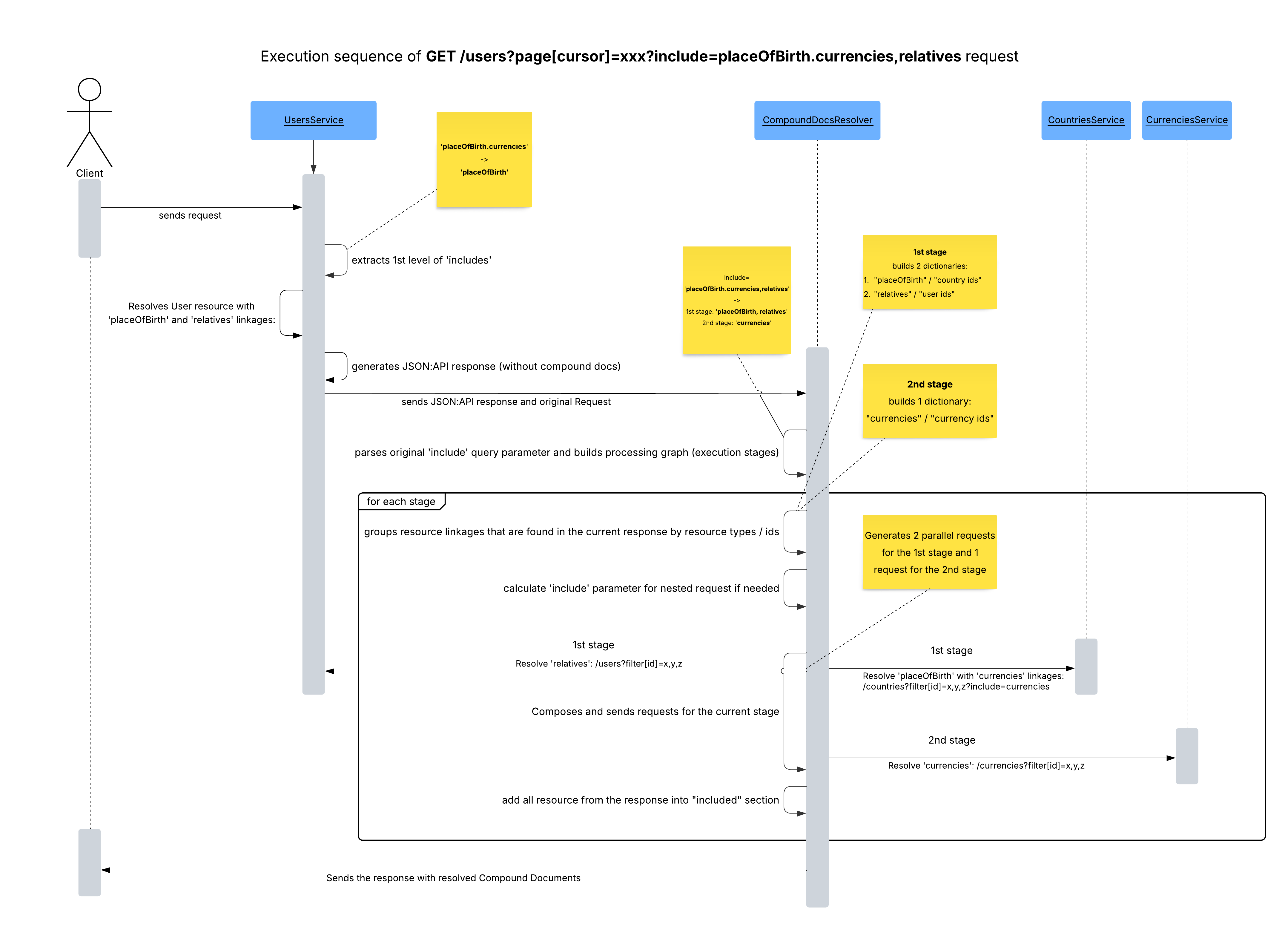
The Compound Documents Resolver operates as a post-processor: it inspects the original response and, if necessary, enriches it with the included section.
JsonApi4j resolves includes in stages.
For example, /users/{id}?include=relatives,placeOfBirth.currencies,placeOfBirth.economy is parsed into:
- Stage 1: resolve list of
relativesand a country that is aplaceOfBirthfor the requested user - Stage 2: resolve
currenciesandeconomyfor a country resolved in Stage 1
Within each stage, resources are grouped by type and their IDs; then, parallel batch requests (e.g. using filter[id]=1,2,3,4,5) are made for each resource type.
If a bulk operation isn’t implemented, the framework falls back to sequential “read-by-id” calls.
That’s why it’s important to implement either “filter[id]” or “read-by-id” operations giving the priority to the first one.
Since each additional level may trigger new batches of requests, it’s important to use this feature judiciously.
You can control and limit the depth and breadth of includes using the CompoundDocsProperties configuration - for example, the maxHops property defines the maximum allowed relationship depth.
Deployment & Configuration
The Compound Documents Resolver is provided by a separate module: jsonapi4j-compound-docs-resolver.
By default, this feature is disabled on the application server.
To enable it, set: jsonapi4j.compound-docs.enabled=true.
Because it’s a standalone module, you can host this logic either:
- within your application server, or
- at an API Gateway level (for example, for centralized response composition).
Performance and Caching
Since JSON:API defines a clear way to uniquely identify resources using the “type” + “id” pair, a cache layer can be integrated - internally or externally - to store resources based on these identifiers.
You can respect TTLs from HTTP Cache-Control headers to manage freshness.
To propagate downstream cache settings upstream, use: CacheControlPropagator#propagateCacheControl(String cacheSettings).
This method forwards cache headers so that the Compound Documents Resolver (or an upstream cache) can reuse them appropriately.
Sequence Overview
Here’s a high-level sequence diagram for the Compound Documents resolution process:
Performance Tuning
Here are some practical tips for optimizing your JsonApi4j application:
- Implement bulk reads using
filter[id]=x,y,z. Always implement bulk resource fetching by ID. If the framework can’t find a bulk operation, it will fall back to sequential “read-by-id” calls - which can significantly increase response time. - Use batch relationship operations. Improve relationship resolution performance by implementing
BatchReadToManyRelationshipOperation<...>orBatchReadToOneRelationshipOperation<...>. When available, these are preferred over basic operations. For example, when reading multiple users and resolving their relationships, the framework will issue a single batched request instead of N (one per user). - Leverage in-house relationship resolution. Whenever possible, resolve relationships directly from your existing in-memory resource models to avoid unnecessary downstream requests. This optimization applies to read resource operations when relationship linkages can be derived directly from the internal data model. To enable it, implement
ReadToOneRelationshipOperation#readForResource(...)orReadToManyRelationshipOperation#readForResource(...)where applicable. - Tune the
ExecutorService. JsonApi4j uses a sharedExecutorServicefor parallel execution. You can configure your own implementation depending on your workload characteristics - for example:Executors.newCachedThreadPool()for dynamic scalingExecutors.newFixedThreadPool(10)for predictable concurrencyExecutors.newVirtualThreadPerTaskExecutor()to experiment with Project Loom virtual threads
- Adjust JsonApi4j configuration properties. Some properties can significantly influence performance, especially for Compound Documents:
jsonapi4j.compound-docs.maxHops=1- limits relationship nesting depth to one leveljsonapi4j.compound-docs.maxIncludedResources=100- caps the total number of included resources resolved per request- Otherwise, granting overly broad access can generate an unsustainable load on the backend system.
Fine-tuning these areas can help you balance performance, resource usage, and response time according to your system’s scale and complexity.
JSON:API Specification Deviations
While JsonApi4j adheres closely to the JSON:API specification, it introduces a few deliberate deviations and simplifications aimed at improving performance, maintainability, and developer experience:
- Flat resource structure - encourages top-level resources like
/usersand/articlesinstead of nested structures such as/users/{userId}/articles. This design enables automatic link generation and simplifies Compound Document resolution. - No support for Sparse Fieldsets (planned for a future release).
- No support for client generated ids (lid). Use the standard id field for client-generated identifiers instead.
- Pagination strategy - while the JSON:API spec is agnostic about pagination style (e.g.
page[number]/page[size]), JsonApi4j standardizes on cursor-based pagination (page[cursor]). - No support for JSON:API Profiles or Extensions (may be added later).
- Controlled relationship resolution - by default, relationship data under ‘relationships’ -> {relName} -> ‘data’ is not automatically resolved. This prevents unnecessary “+N” requests and gives developers explicit control over relationship fetching.
- Mandatory “read by ID” operations - the framework requires implementation of either Filter by ID (
GET /users?filter[id]=123) or Read by ID (GET /users/123) operations. These are essential for the Compound Documents Resolver to assemble the “included” section efficiently.