Access Control Plugin
Overview
The Access Control Plugin is a plugin that enforces security rules during JSON:API request processing without altering the core execution flow. It evaluates access requirements at well-defined stages of the request lifecycle and conditionally allows, anonymizes, or short-circuits parts of the request or response based on the resolved principal context.
To enable the Access Control plugin, add the following dependency:
<dependency>
  <groupId>pro.api4</groupId>
  <artifactId>jsonapi4j-ac-plugin</artifactId>
  <version>${jsonapi4j.version}</version>
</dependency>
If you’re using Spring Boot or Quarkus, the plugin is auto-configured with default values.
Access control is applied at two points of the request processing pipeline:
- Inbound evaluation – before any data is fetched (pre-retrieval stage). Rules are evaluated against the incoming
JsonApiRequest. If access is denied, downstream execution is skipped and the response is safely anonymized. - Outbound evaluation – after data has been fetched and the JSON:API document has been composed (post-retrieval stage). Rules are evaluated per resource and relationship element, allowing fine-grained control over visibility of attributes, meta, links, and relationship identifiers.
The plugin derives its rules from @AccessControl annotations placed on operations, resources, relationships, attributes, or individual fields.
During execution, it traverses JSON:API structures using explicit visitor points and applies access decisions consistently across resource objects and resource identifier objects.
This design enables declarative, centralized security policies while keeping domain logic and request handling clean, predictable, and specification-compliant.
Evaluation stages
As it was mentioned above access control evaluation is performed twice during the request lifecycle - during the inbound and outbound stages.
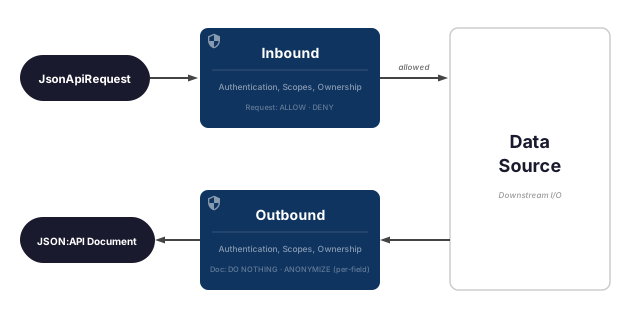
Inbound Evaluation Stage
During the inbound stage, the JsonApi4j application has received a request but has not yet fetched any data from downstream sources.
Access control rules are evaluated against the JsonApiRequest since no other data is available at this point.
If access control requirements are not met, data fetching is skipped, and the data field in the response will be fully anonymized.
Inbound access control requirements can be defined on an operations level by placing @AccessControl annotation on top of the class declaration. When implementing ResourceOperations<RESOURCE_DTO>, ToOneRelationshipOperations<RESOURCE_DTO, RELATIONSHIP_DTO> or ToManyRelationshipOperations<RESOURCE_DTO, RELATIONSHIP_DTO> interfaces @AccessControl annotation must be placed above the corresponding method.
Outbound Evaluation Stage
The outbound stage occurs after data has been fetched from the data source, the response document has been composed, and right before it is sent to the client. At this point, access control rules are evaluated for each JSON:API Resource Object or Resource Identifier Object within the generated JSON:API document.
Resource Documents
Resource documents typically contain full JSON:API Resource Objects.
Access control requirements can be defined for:
- Entire Resource Object - if requirements are not met, the whole resource is anonymized.
@AccessControlannotation must be placed on top of the class that implementsResource<RESOURCE_DTO>interface. - Specific members (e.g.,
attributes,links,meta) - if requirements are not met, only those members are anonymized.@AccessControlannotation must be placed above theresolveAttributes(...),resolveResourceLinks(...)or other methods accordingly. - Individual
attributefields - if requirements are not met, only the affected fields are anonymized.@AccessControlannotation must be placed for the needed field.
Relationship Documents
Relationship documents contain only Resource Identifier Objects. Access control rules can be defined for:
- Entire Resource Identifier Object - if requirements are not met, the entire resource identifier will be anonymized.
@AccessControlannotation must be placed on top of the class that implementsToOneRelationship<RELATIONSHIP_DTO>orToManyRelationship<RELATIONSHIP_DTO>interface. - Specific members (e.g.,
meta) - if requirements are not met, only those members will be anonymized.@AccessControlannotation must be placed above theresolveResourceIdentifierMeta(...)method.
What a denial returns
For a GET, a denied request returns 200 with the restricted data omitted rather than an error — a 403
would fail the whole response including the parts the caller is allowed to see, and would break compound
documents.
For everything else, a denied request returns 403 with an error code naming what failed:
| Requirement that failed | Error code |
|---|---|
entitlements |
INSUFFICIENT_ENTITLEMENTS |
scopes |
INSUFFICIENT_SCOPES |
authenticated, ownership, policy |
FORBIDDEN |
Entitlements and scopes are named because they tell a caller different things — one needs different credentials, the other a differently-scoped token. Ownership stays generic deliberately: reporting “you are not the owner” would confirm that the resource exists and that somebody else holds it. A policy is application code with no code of its own to report.
A custom evaluator can report any ErrorCode it likes, including its own — see
Overriding the AccessControlEvaluator.
Access Control Requirements
By default, JsonApi4j does not enforce any access control (i.e., all requests are allowed). However, you can configure and enforce access control rules for either or both stages - inbound and outbound - depending on your security and data exposure requirements.
There are five types of access control requirements, which can be combined in any way as needed:
- Authentication requirement - verifies whether the request is made on behalf of an authenticated client or user. This can be used to restrict anonymous access.
- Entitlement requirement - verifies whether the client or user holds a given entitlement. Entitlements are plain, unordered labels that your application defines and your principal source supplies - any string works.
DefaultEntitlementsoffers PARTNER, ADMIN and ROOT_ADMIN as ready-made constants, but they carry no built-in ranking, and there is no label meaning “everyone” or “nobody” - omit the requirement to demand nothing, and name an entitlement no principal carries to deny everyone. See more details below. - OAuth2 scope(s) requirement - verifies whether the request was authorized to access user data protected by certain OAuth2 scopes. This information is typically embedded within the JWT access token. Declared with the same two-level clause structure as entitlements. See more details below.
- Ownership requirement - ensures that the requested resource belongs to the client or user making the request. This is typically used for APIs where users are only allowed to view their own data, but not others’.
- Policy requirement - decides the rule in code, for anything the four declarative forms cannot express - reading the caller’s attributes, branching on the operation being performed, or comparing the caller against the resource being returned. See more details below.
If any of the specified requirements are not met, the corresponding section - or the entire object - will be anonymized.
Setting Principal Context
By default, the plugin uses the DefaultPrincipalResolver, which relies on the following HTTP headers to resolve the current authentication context:
X-Authenticated-User-Id- identifies whether the request is sent on behalf of an authenticated client or user. Considered authenticated if the value is not null or blank. Also used for ownership checks.X-Authenticated-Client-Entitlements- defines the principal’s entitlements, as a space-separated list. Any string works;DefaultEntitlementsships PARTNER, ADMIN and ROOT_ADMIN as constants purely for convenience.X-Authenticated-User-Granted-Scopes- specifies the OAuth2 scopes granted to the client by the user. This should be a space-separated string.
This is not the only option. JsonApi4j also ships resolvers that build the principal from a JWT — either by
decoding the Authorization header directly, or by reading claims Spring Security or Quarkus OIDC have
already verified — and you can implement PrincipalResolver yourself for anything else. See
Principal Resolution for the full list, how to choose between them, and how to map
your provider’s claims.
If you use entitlement requirements together with a JWT resolver, note that you must name the claim that carries the entitlement — JWT defines no standard one, and an unresolved entitlement denies every entitlement-guarded operation. This is covered in Entitlements need an explicit claim.
The resolved principal context is then used by the framework during both inbound and outbound access control evaluations.
Setting Access Requirements
There is one annotation that defines all access control requirements in one place — @AccessControl.
It encapsulates rules for all currently supported dimensions: authenticated, scopes, entitlements, ownership, and policy.
Entitlements Are Unordered Labels
Entitlements are matched by name, not by rank. A principal holding ADMIN does not satisfy a requirement for
PARTNER — it satisfies a requirement for ADMIN and nothing else. Grant a principal every entitlement it needs
rather than expecting a “higher” one to cover the others.
A requirement is built from @EntitlementsGroup clauses. Each clause quantifies over entitlement names:
| Clause mode | Satisfied when the caller holds |
|---|---|
ANY_OF (default) |
at least one of the listed entitlements |
ALL_OF |
all of the listed entitlements |
NONE_OF |
none of the listed entitlements |
@AccessControlEntitlements then quantifies over the clauses, using the same three modes — ALL_OF by
default. That gives two levels:
@AccessControl(entitlements = @AccessControlEntitlements(
        description = "internal support staff, or a partner integration",
        mode = AccessControlEntitlements.Mode.ANY_OF,
        value = {
                @EntitlementsGroup(value = {ADMIN, "SUPPORT"}, mode = EntitlementsGroup.Mode.ALL_OF),
                @EntitlementsGroup(value = {PARTNER, "INTEGRATOR"}, mode = EntitlementsGroup.Mode.ALL_OF)
        }))
which reads as (ADMIN and SUPPORT) or (PARTNER and INTEGRATOR). ADMIN and PARTNER come from
DefaultEntitlements; SUPPORT and INTEGRATOR are plain strings — any label your principal source produces works.
The simple case stays short — a single clause with the default ANY_OF:
@AccessControl(entitlements = @AccessControlEntitlements(@EntitlementsGroup(ADMIN)))
Omit entitlements entirely to declare no requirement. An empty @EntitlementsGroup({}) is rejected at
startup, so a requirement that can never be satisfied fails on boot rather than silently denying every
request.
description is optional and quoted back when access is denied, so a log line explains why the
requirement exists rather than only naming entitlements:
DEBUG Access denied: 'internal support staff, or a partner integration'
      (ANY_OF[ALL_OF[ADMIN, SUPPORT], ALL_OF[PARTNER, INTEGRATOR]]) is required,
      but the authenticated principal carries [PARTNER].
Scopes Use the Same Structure
Scopes are declared exactly like entitlements — @ScopesGroup clauses combined by
@AccessControlScopes, with the same three modes. Matching is by exact name.
@AccessControl(scopes = @AccessControlScopes(
        description = "read access to profiles, or full admin access",
        mode = AccessControlScopes.Mode.ANY_OF,
        value = {
                @ScopesGroup({"users.read", "profiles.read"}),
                @ScopesGroup("admin.full")
        }))
which reads as (users.read and profiles.read) or admin.full. The simple case stays short:
@AccessControl(scopes = @AccessControlScopes(@ScopesGroup("users.sensitive.read")))
| Clause mode | Satisfied when the caller was granted |
|---|---|
ALL_OF (default) |
all of the listed scopes |
ANY_OF |
at least one of the listed scopes |
The clause default is ALL_OF rather than entitlements’ ANY_OF, because a scope requirement normally asks
for every scope it lists.
For rules this cannot express — weighing scopes together with the operation, the resource, or the caller’s
attributes — use a policy; it reads the granted scopes from
context.principal().authenticatedClientScopes().
Where to Place @AccessControl
| Target | Placement | Effect when requirements are not met |
|---|---|---|
| Operation (inbound) | On the operation method (e.g. create(), readById()) |
Data fetching is skipped; response data is anonymized |
| Entire Resource Object | On the class implementing Resource<T> |
The whole resource object is anonymized |
| Resource attributes | On resolveAttributes() method or on the attributes class |
Attributes section is anonymized |
| Resource links | On resolveResourceLinks() method |
Links section is anonymized |
| Resource meta | On resolveResourceMeta() method |
Meta section is anonymized |
| Individual attribute field | On the field in the attributes class | Only the affected field is anonymized |
| Nested object | On a class held by the attributes, or on its fields | Applies wherever an instance of that class appears, at any depth |
| Collection, array or map element | On the element class, or on its fields | Applied per element; an element denied entirely is dropped from the container |
| A runtime type more specific than the field’s declared type | On the runtime class | Applies — requirements come from the object present, not from how the field was declared |
| Entire Relationship | On the class implementing ToOneRelationship<T> or ToManyRelationship<T> |
The entire resource identifier is anonymized |
| Relationship meta | On resolveResourceIdentifierMeta() method |
Meta section of the resource identifier is anonymized |
Ownership: Inbound vs. Outbound
The ownership setting works differently depending on the evaluation stage:
| Stage | Property | How it works |
|---|---|---|
| Inbound (pre-retrieval) | ownerIdExtractor |
A class that extracts the owner ID from the incoming request (e.g. from the URL path) |
| Outbound (post-retrieval) | ownerIdFieldPath |
A field path pointing to the owner ID in the JSON:API response (e.g. "id") |
The examples below show these placements at work.
Policies: Deciding Access in Code
Each declarative requirement has a fixed shape — authenticated is a flag, entitlements is two levels of
name matching, scopes is an expression, ownership is an id comparison. When a rule doesn’t fit any of
them, write it as code:
public class SameTenantPolicy implements AccessPolicy {

    @Override
    public boolean isSatisfiedBy(AccessControlContext context) {
        Object callerTenant = context.principal().attributes().get("tenant");
        return callerTenant != null
                && context.operation().getOperationType() != OperationType.DELETE_RESOURCE;
    }

}
@AccessControl(policy = @AccessControlPolicy(
        value = SameTenantPolicy.class,
        description = "caller's tenant must be set, and may not delete"))
A policy is ordinary code — unlimited nesting, unit-testable without a running app, and reusable across as many annotations as you like. It is combined with the other requirements exactly as they are combined with each other: every declared requirement must pass. It runs last, after the cheaper declarative checks have had their chance to deny.
Instances are created once when the access control model is built, so a policy must be stateless, thread-safe, and expose a public no-argument constructor. A class that cannot be constructed fails at startup rather than on the first request that reaches it.
What a policy can see
AccessControlContext follows the vocabulary shared by XACML, AWS Cedar and AWS IAM — who is asking, what
they are doing, to what, and under what circumstances:
| Accessor | Dimension | Notes |
|---|---|---|
principal() |
subject | Never null; attributes() is where a JWT-claims resolver puts its claims |
operation() |
action | OperationType, ResourceType, RelationshipName |
resource() |
object | Present outbound only — the resource being emitted |
resource(Class) |
object | The same, narrowed to a type; empty rather than throwing if it is something else |
request() |
environment | Headers, filters, includes |
stage() |
— | INBOUND before data is fetched, OUTBOUND before it is sent |
operation() is the dimension no other requirement can reach: it lets a rule turn on what the caller is
doing rather than who they are — “internal bookkeeping is visible on a single-resource lookup, but never
in a list response”.
Because attributes() is populated by whichever PrincipalResolver is configured, a policy is also the
natural place to act on JWT claims. See Principal Resolution for how claims get
there — note the header-based DefaultPrincipalResolver leaves attributes() empty.
A policy, or a different evaluator?
A policy changes the decision for one annotated element. AccessControlEvaluator — the bean that runs
every requirement — changes it for the whole application, and replacing it makes you responsible for all
five requirement types everywhere.
So reach for a policy when the rule is unusual, and replace the evaluator only when evaluation itself is:
decisions delegated to an external authorization service, an audit record written for every decision, or
caching. Extend DefaultAccessControlEvaluator rather than starting from scratch, so the requirements you
are not changing keep working.
See Overriding the AccessControlEvaluator for the per-framework wiring.
Examples
Example 1: Inbound Access Control
Let’s allow new user creation only for authenticated clients with the ADMIN entitlement.
In this case, we’ll use the @AccessControl annotation to enforce the access rule at the operation level.
import static pro.api4.jsonapi4j.principal.entitlement.DefaultEntitlements.ADMIN;

public class UserOperations implements ResourceOperations<UserDbEntity> {

    @AccessControl(
            authenticated = Authenticated.AUTHENTICATED,
            entitlements = @AccessControlEntitlements(@EntitlementsGroup(ADMIN))
    )
    @Override
    public UserDbEntity create(JsonApiRequest request) {
        // ...
    }

}
Example 2: Outbound Access Control for Attributes Object
First, let’s limit access to a personal data for all non-authorized users.
Secondly, let’s hide the user’s credit card number from everyone except the owner. To achieve this, we need place the @AccessControl annotation on top of the class declaration and on the creditCardNumber field.
Notes:
authenticated = Authenticated.AUTHENTICATED- requires the framework to check whether the client that initiated this request is authenticated.@AccessControlScopes(@ScopesGroup("users.sensitive.read"))- forces the framework to check if client initiated this request has got permissions from the resource owner to access their sensitive data.@AccessControlOwnership(ownerIdFieldPath = "id")- tells the framework that the owner id is located in theidfield of the JSON:API Resource Object. That is true because we deal with users and user id represents who own this data.
@AccessControl(authenticated = Authenticated.AUTHENTICATED)
public class UserAttributes {

    private final String firstName;
    private final String lastName;
    private final String email;

    @AccessControl(
            authenticated = Authenticated.AUTHENTICATED,
            scopes = @AccessControlScopes(@ScopesGroup("users.sensitive.read")),
            entitlements = @AccessControlEntitlements(@EntitlementsGroup(ADMIN)),
            ownership = @AccessControlOwnership(ownerIdFieldPath = "id")
    )
    private final String creditCardNumber;

    // ...

}
Example 3: Outbound Access Control for Resource Object
Now, let’s showcase how to hide some sections on the Resource Object level. Since we don’t have a dedicated class for it, we need to use our Resource declaration class for it.
In the example below we’ve configured our entire UserResource in a way it’s visible only for authenticated users while its meta section is only visible for clients with ADMIN entitlement:
@AccessControl(authenticated = Authenticated.AUTHENTICATED)
public class UserResource implements Resource<UserDbEntity> {

  @AccessControl(entitlements = @AccessControlEntitlements(@EntitlementsGroup(ADMIN)))
  @Override
  public Object resolveResourceMeta(JsonApiRequest request, UserDbEntity dataSourceDto) {
      // ...
  }

}
Example 4: Outbound Access Control for Resource Identifier Object
The last example will show how to hide some sections on the Resource Identifier Object level. This object is used for all relationship operations in a response document instead of well known Resource Object. Since we don’t have a dedicated class for it, we need to use our Relationship declaration class for it.
In the example below we’ve configured our entire UserCitizenshipsRelationship in a way this relationship is visible only for authenticated users that have been granted ‘users.citizenships.read’ scope for a client. Moreover, ownership setting requires a user to be an owner; thus, this information is only visible for a user it belongs to. And finally, lets expose its meta section for clients with ADMIN entitlement only:
@AccessControl(
        authenticated = Authenticated.AUTHENTICATED,
        scopes = @AccessControlScopes(@ScopesGroup("users.citizenships.read")),
        ownership = @AccessControlOwnership(ownerIdExtractor = ResourceIdFromUrlPathExtractor.class)
)
public class UserCitizenshipsRelationship implements ToManyRelationship<CountryRef> {

  @AccessControl(entitlements = @AccessControlEntitlements(@EntitlementsGroup(ADMIN)))
  @Override
  public Object resolveResourceIdentifierMeta(JsonApiRequest relationshipRequest,
                                              CountryRef countryRef) {
    // ...
  }

}
Notes
If you’re working with the jsonapi4j-core module directly (without the REST layer), you can place @AccessControl on a custom ResourceObject, Attributes object, or their fields for outbound evaluations. For inbound evaluations, the annotation can also be placed at the class level of the Request class.
How Fields Are Hidden
Hiding a field never modifies your object. The plugin builds a copy of the attributes object with the
denied fields left null and puts the copy in the response, so the instance your Resource returned comes
back untouched. That matters because nothing stops a resource from returning a cached, shared, or otherwise
long-lived object — nulling a field on one would corrupt it for every later request.
Copies are made only along the path to a hidden field, and only when something is actually hidden. When a caller may see everything, the original object is passed straight through and nothing is allocated.
Building the copy does not call your constructor, so constructors that validate their arguments, normalise them, or take them in a different order than the fields are declared all work fine. Records are the one exception: their components cannot be written after construction, so a record is rebuilt through its canonical constructor instead.
Requirements follow the object, not the field
Requirements are read from the type of the value actually present, at the moment the response is built.
A rule declared on a class therefore applies wherever an instance of that class turns up — held directly,
at any depth, inside a container, or behind a field declared as an interface, a supertype or Object:
public class UserAttributes {
    private Address home;              // rule on Address applies
    private List<Address> addresses;   // applies to every element
    private Payment payment;           // applies to whatever CardPayment declares
}
Containers
A container is rebuilt only when one of its elements is replaced or dropped. A List comes back as a
List, a Map as a Map, an array with the same component type, and sorted types keep their comparator —
though the concrete class may differ, so a field declared List can receive an ArrayList. A field
declared with a concrete type receives that type, provided it can be constructed empty and filled; if it
cannot, the request fails rather than return data that should have been hidden.
An element the caller may not see at all is dropped, so a container carries only what they may see. Two consequences worth knowing: its length depends on the caller, and indices do not line up between callers.
Limitations
| Scenario | Behavior |
|---|---|
Primitive-typed fields (e.g. int) |
Cannot be hidden — a primitive can’t hold “absent”. A denied caller gets an error instead of a hidden value. Use the boxed type (e.g. Integer). Reported — see below. |
@AccessControl on the container field itself (e.g. on List<Address> addresses) |
Enforced — the whole collection, array or map is hidden, without inspecting elements. |
| Map keys | Not inspected. A JSON member name is a string, so a requirement on a key type has nothing to hide. A denied map value takes its whole entry with it. |
A container declared with a concrete type that cannot be rebuilt (e.g. ImmutableList<Address> addresses) |
The request fails with an error naming the field, but only when something inside that container actually had to be hidden. Declare the field as List, Set, Map, Collection, an array or Optional, or give the type a public no-argument constructor. |
Framework types below the response root (ResourceObject, RelationshipObject, LinksObject) |
Not descended into. Relationships are anonymized by their own requirements at their own stage. |
@AccessControl on a static field |
No effect — static fields are never serialized into a response. Reported — see below. |
@AccessControl on a field that shadows an inherited field of the same name |
Only the most-derived declaration is used, so a requirement on the inherited one is ignored. Rename one of them. Reported — see below. |
@AccessControl that declares no requirement at all (a bare @AccessControl) |
Enforces nothing. Set one of authenticated, entitlements, scopes, ownership or policy, or remove it. Reported — see below. |
| Attributes object is a dynamic proxy (e.g. a Hibernate/CGLIB proxied entity) | Cannot be copied, so the request fails with a clear error. Return a DTO rather than a proxied entity. |
Attributes class lives in a JPMS module that does not open its package |
Reflective access fails. Open the package to the framework. |
Application meta that is not a Map |
The anonymization report cannot be added to it — there is nowhere to put a member on an arbitrary type — so it is skipped and logged once. Return a Map from your meta resolvers if you want the report. |
Denied GET requests |
Return 200 with the restricted data omitted, not 403. A 403 would fail the whole response, including the parts the caller is allowed to see, and would break compound documents. |
Responses marked Cache-Control: public |
Anonymization runs per caller, so the body is not the same for everyone — but a shared cache is entitled to store one copy and serve it to the next caller. The framework forwards the directive your operation returns and does not override it. Use private for per-caller caching. See Caching. |
These cases are reported once, when the access control model for a class is first built, naming the class and field involved — so a rule that can never take effect shows up in your logs rather than silently doing nothing.
Turning those reports into failures
Set jsonapi4j.ac.failOnMisconfiguration=true and each of them raises
AccessControlMisconfigurationException instead of logging. Off by default, because turning a warning into
a failure would break an application that has been running with a rule that quietly does nothing. It earns
its keep in tests and CI, where a security rule silently not applying is exactly what you want to hear
about loudly.
It covers only what is decidable from a class: a requirement on a primitive or static field, on a shadowed field name, or one that asks for nothing at all. It deliberately does not cover diagnostics about the caller — a principal arriving with no entitlements is a token or deployment problem rather than a misconfigured application, and such requests already fail closed.
Despite the name, this is not startup validation. Requirements on a resource, operation or relationship class are read when the plugin registers, but an attributes class is only known once a response carries one — so most of these are raised on the first request that touches the resource, not at boot.
Native Image (GraalVM / Quarkus)
Building the redacted copy instantiates your attributes class reflectively, which a native image allows
only for classes registered ahead of time. The Quarkus extension registers them for you by scanning for
@AccessControl at build time.
Quarkus indexes your application module automatically but not its dependencies. If your attributes classes live in a separate jar, that jar has to carry a Jandex index or the registration will find nothing. Build one into it with the Jandex Maven plugin:
<plugin>
    <groupId>io.smallrye</groupId>
    <artifactId>jandex-maven-plugin</artifactId>
    <version>3.5.3</version>
    <executions>
        <execution>
            <id>make-index</id>
            <goals>
                <goal>jandex</goal>
            </goals>
        </execution>
    </executions>
</plugin>
That keeps the concern with the module that owns the classes, so every consuming application picks it up without configuration. If you cannot change the producing jar — a third-party dependency, say — index it from the consuming application instead:
quarkus.index-dependency.my-domain.group-id=com.example
quarkus.index-dependency.my-domain.artifact-id=my-domain
If access control is enabled and no @AccessControl is found in the index, the build logs a warning
naming both options.
Telling a caller something was hidden
A denied GET returns 200 with the restricted data left out, which a caller cannot tell apart from there
being nothing to return. jsonapi4j.ac.anonymizationReport closes that gap by adding an accessControl
member to the response meta:
{
  "meta": { "accessControl": { "anonymized": true } },
  "data": { "id": "1", "type": "users",
    "attributes": { "fullName": "John Doe" },
    "meta": { "accessControl": { "anonymized": true, "fields": [
      { "path": "attributes.creditCardNumber",    "reason": "INSUFFICIENT_SCOPES" },
      { "path": "attributes.addresses[0].zip",    "reason": "INSUFFICIENT_SCOPES" }
    ]}}
  }
}
Four levels, each saying strictly more than the one before:
| Level | What a response carries |
|---|---|
NONE |
Nothing. Responses are exactly as they were before this existed. Default. |
INDICATOR |
That something was hidden, without saying what. |
FIELDS |
The paths that were hidden, indexed into containers as addresses[0].zip. |
FIELDS_AND_REASONS |
Also the error code of the requirement that refused each path. |
The top level of the document carries the indicator; each resource names its own hidden paths in its own
meta. The member appears only when something was actually hidden, so its absence alongside an empty
data means there genuinely was nothing to return — which is the question the feature exists to answer.
This discloses. Saying that something was hidden confirms that something is there, which is why the
plugin otherwise keeps ownership denials generic. FIELDS_AND_REASONS goes further and tells a caller
which entitlement or scope would reveal each field — excellent for a partner integrating against your API,
and a map of your authorization model for anyone probing it. Turn it on deliberately, and prefer the lowest
level that answers your callers’ question.
The report is written after anonymization and is not itself subject to it, so it survives on a resource
whose meta was withheld — the caller sees no application meta, and still learns that something was kept
from them.
Available Properties
| Property name | Default value | Description |
|---|---|---|
jsonapi4j.ac.enabled |
true |
Enables/Disables Access Control plugin |
jsonapi4j.ac.failOnMisconfiguration |
false |
Reject access control that is declared but cannot take effect, instead of only logging it. See below. |
jsonapi4j.ac.anonymizationReport |
NONE |
How much a response says about what was hidden from the caller: NONE, INDICATOR, FIELDS, FIELDS_AND_REASONS. See below. |
Related
- Principal Resolution — where the principal a requirement is evaluated against comes from
- Configuration — registering custom beans per framework
- Request Processing Pipeline — where inbound and outbound evaluation happen